
Licomp Toolkit - Command Line Guide Before you start using licomp-toolkit we suggest you read: Licomp reply format Licomp reply format Defaults licomp-toolkit by default uses: usecase library- i.e. the licenses component is used as a library (e.g. linking to it) provisioning binary-distribution modification is not yet implemented You can change this using corresponding options (see below).
Licomp Toolkit
Licomp Toolkit
Licomp Toolkit … Compatibility without the guesswork
The licomp-toolkit is a Python-based utility designed to evaluate license compatibility between different software components. It serves as a bridge to multiple compatibility resources, allowing developers and legal teams to determine if an inbound license (e.g., a library they want to use) is legally compatible with their project’s outbound license.
Example question with a licomp-toolkit answer
Can I use an inbound component under license LGPL-2.1-or-later AND Apache-2.0 to my program licensed under BSD-3-Clause?
$ licomp-toolkit -of text verify --inbound-license "LGPL-2.1-or-later AND Apache-2.0" --outbound-license "BSD-3-Clause"
outbound:      BSD-3-Clause
inbound:       Apache-2.0 AND LGPL-2.1-or-later
resources:     licomp_osadl, licomp_reclicense
provisioning:  binary-distribution
usecase:       library
compatibility: yes
Introduction
Licomp can be used to help determine if an inbound license is compatible with an outbound license. These compatibility checks need context which is often missing in tools, resources and discussions. The context above must be provided to licomp-toolkit. In short the context is:
- use case - how you use the licensed component
- provisioning - how you provide the component to your user
- modification - if you have modified the component
Who should use licomp-toolkit?
It is particularly valuable for the following roles:
Software Developers and Engineers
-
Verify if a new library’s license (e.g.,
MIT) is compatible with their project’s outbound license (e.g.,GPL-2.0-only) -
Execute license compliance checks in your CI/CD
Legal and Compliance Officers
-
Review human readable license compliance reports from CI/CD.
-
Generate structured data that serves as an audit trail.
Open Source Program Office (OSPO) Managers
-
Policy Enforcement: Managers can use the toolkit’s API to build internal dashboards that monitor compliance across repositories.
-
Supply Chain Security: It helps ensure that the Software Bill of Materials (SBOM) for a product is not only accurate but also legally sound.
Product Managers and Release Engineers
Release teams use the toolkit to avoid “legal blockers” that could delay a product launch.
- Distribution Planning: Before a product is shipped in a specific format (like a proprietary binary or a SaaS offering), the toolkit identifies if the inbound licenses permit that specific distribution method.
Architectural overview
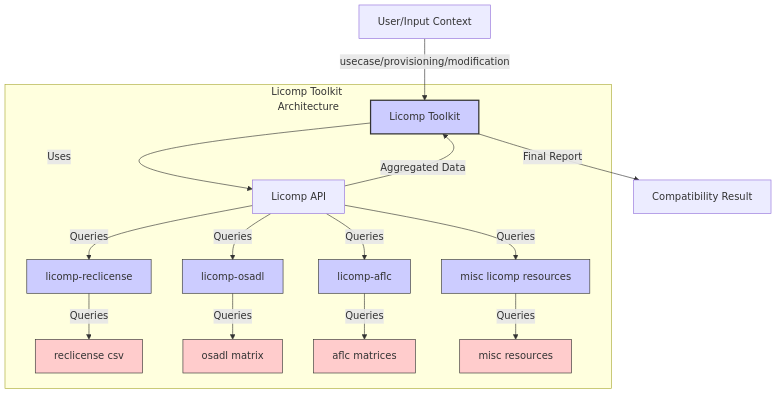
Licomp toolkit is using the Licomp api to communicate with the Licomp resources. For a better understanding of Licomp we suggest you read:
Licomp resources
Licomp toolkit uses the following compatibility resources using the Licomp api: licomp-hermione, licomp-osadl, licomp-proprietary, licomp-reclicense, licomp-dwheeler and licomp-gnuguide.
Using Licomp Toolkit
Command line interface (brief intro)
If you want to check if the following is compatible:
- outbound license “MIT”
- inbound license “LGPL-2.0-or-later”
$ licomp-toolkit verify -il MIT -ol LGPL-2.0-or-later | jq .summary.results
{
  "nr_valid": "1",
  "yes": {
    "count": 1,
    "percent": 100.0
  }
}
In the above example, licomp-toolkit by default chose:
- usecase
library- i.e. the licenses component is used as a library (e.g. linking to it) - provisioning
binary-distribution - modification is not yet implemented
For more detailed guides to licomp-toolkit, please check out:
Python module
If you want to check if the following is compatible:
- outbound license “MIT”
- inbound license “LGPL-2.0-or-later”
>>> from licomp_toolkit.toolkit import LicompToolkit
>>> licomp_toolkit = LicompToolkit()
>>> compatibilities = licomp_toolkit.outbound_inbound_compatibility("MIT", "LGPL-2.0-or-later", "library", "binary-distribution")
>>> print(str(compatibilities['summary']['results']))
{'nr_valid': '1', 'yes': {'count': 1, 'percent': 100.0}}
For a more detailed guide to the licomp-toolkit Python api, please check out: Licomp Toolkit - Python module
License
Licomp Toolkit is released in GPL-3.0-or-later
Installing Licomp Toolkit
What tools use Licomp Toolkit
Sponsors
As part of Automated FOSS License Compliance, Licomp Toolkit is sponsored (2025-2026) by:


About this page
This page was automatically generated from ssh://git@codeberg.org/software-compliance-org/licomp-toolkit/src/branch/main/README.md
Installing Licomp Toolkit From pypi.org Licomp Toolkit is available via pypi.org at: https://pypi.org/project/licomp-toolkit/. To install, simply do the following: $ pip install licomp-toolkit From github Installing from github assumes you already have pip installed. $ git clone https://github.com/hesa/licomp-toolkit $ pip install -r requirements.txt $ pip install -r requirements-dev.txt $ pip install .
Licomp Toolkit - Python module in the making
Licomp Toolkit - Reply Format The previous format (0.3) was for checking a license against a license, e.g. can I use outbound license when using a component under inbound license given a specific context. This format extends to looking at expressions (e.g. MIT OR BSD-3-Clause) instead. This new format will be much more complex so we will define sub formats, which will be used by the top format.
Licomp Toolkit - Reply Format Example output (version 0.3) Note: Please note that in the example below only one of the compatibility results from the compatibility resources is listed (licomp_reclicense). This is to save space by removing multiple text segments being similar. { "compatibilities": { "licomp_reclicense": { "status": "success", "status_details": { "provisioning_status": "success", "usecase_status": "success", "license_supported_status": "success" }, "outbound": "MIT", "inbound": "MIT", "usecase": "library", "provisioning": "binary-distribution", "modification": "unmodified", "compatibility_status": "yes", "explanation": "Inbound and outbound license are the same: MIT", "api_version": "0.3", "resource_name": "licomp_reclicense", "resource_version": "0.3.0", "resource_disclaimer": "The data or the output of the tools in this repository come with guarantee" }, // we have removed the output from some of the licomp resources here }, "summary": { "resources": [ "licomp_reclicense:0.3.0", "licomp_osadl:0.3.0", "licomp_hermione:0.3.0", "licomp_proprietary:0.3.0", "licomp_dwheeler:0.3.1" ], "outbound": "MIT", "inbound": "MIT", "usecase": "library", "provisioning": "binary-distribution", "statuses": { "success": [ "licomp_reclicense", "licomp_hermione", "licomp_proprietary" ], "failure": [ "licomp_osadl", "licomp_dwheeler" ] }, "compatibility_statuses": { "yes": [ "licomp_reclicense", "licomp_hermione", "licomp_proprietary" ] }, "results": { "nr_valid": "3", "yes": { "count": 3, "percent": 100.0 } } }, "nr_licomp": 5, "meta": { "disclaimer": "This software and the data come with no gurantee. For more information read the disclaimers from the individual compatibility resources, and contact a lawyer to make sure your software is compliant." } } Reply details compatibilities Contains a map of replies from the available licomp resources. Each reply is in the Licomp reply format.